
Bodic Atlas
Your management company's memory and project steering, at the heart of the CRM. Your processes, internal projects, meetings and acceptance testing live in the same place as your funds, investors and opportunities. No more forgotten wiki or tracking spreadsheets passed around by email: Atlas connects what you know how to do with what you are doing right now.
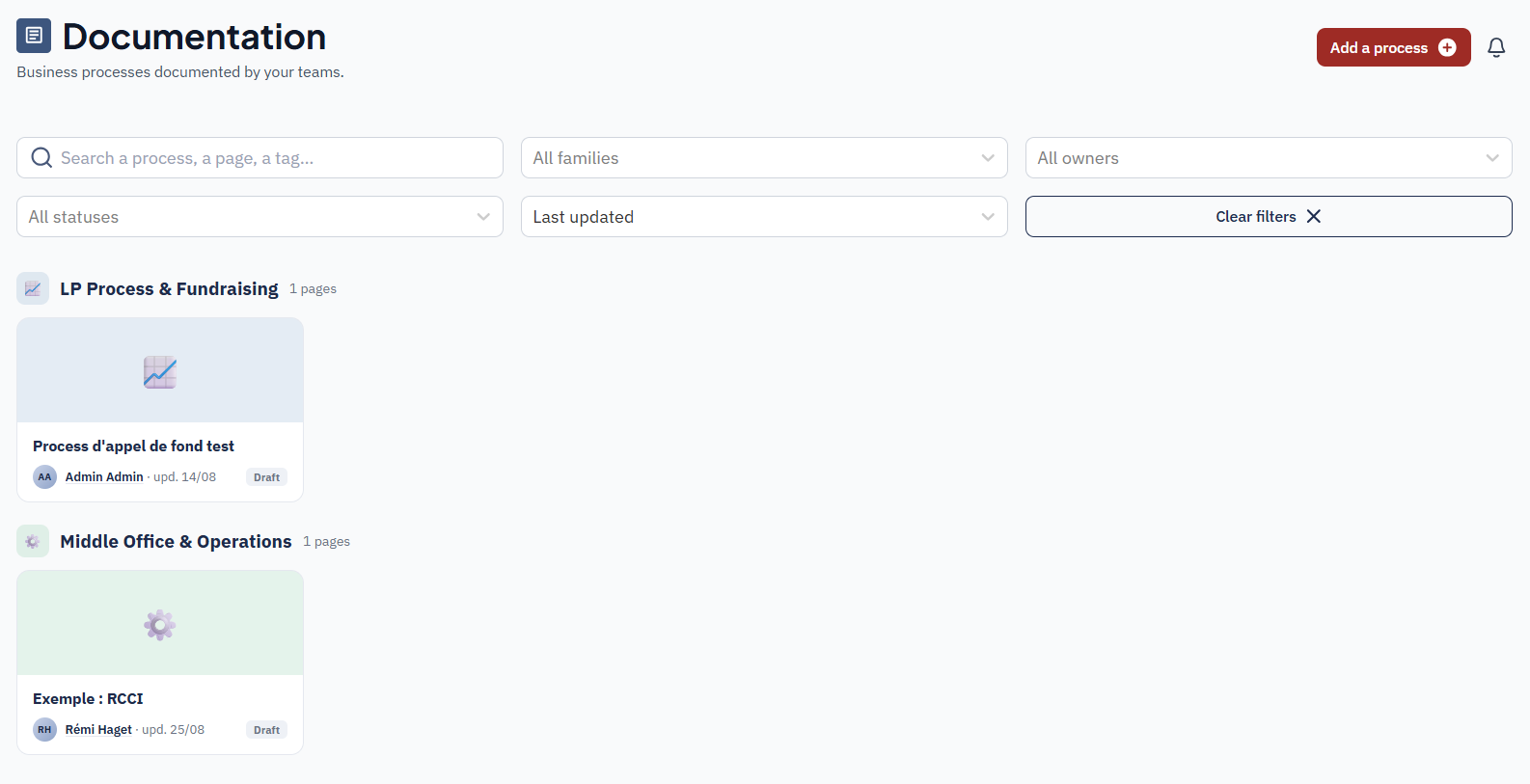
Document your processes, and keep them up to date
LP onboarding, capital calls, valuation, compliance, tools: every process has its page, filed by family.
- Clear pages: text, tables, callouts, steps, images and attachments.
- An owner for every page: each page has an owner. A colleague can request an update in one click, and a task is immediately assigned to the owner.
- A review status: up to date, to review, draft or archived. A page can switch back to "to review" automatically on the date you set.
- A version history: every change is kept, and an earlier version can be restored.
From process to project, in one click
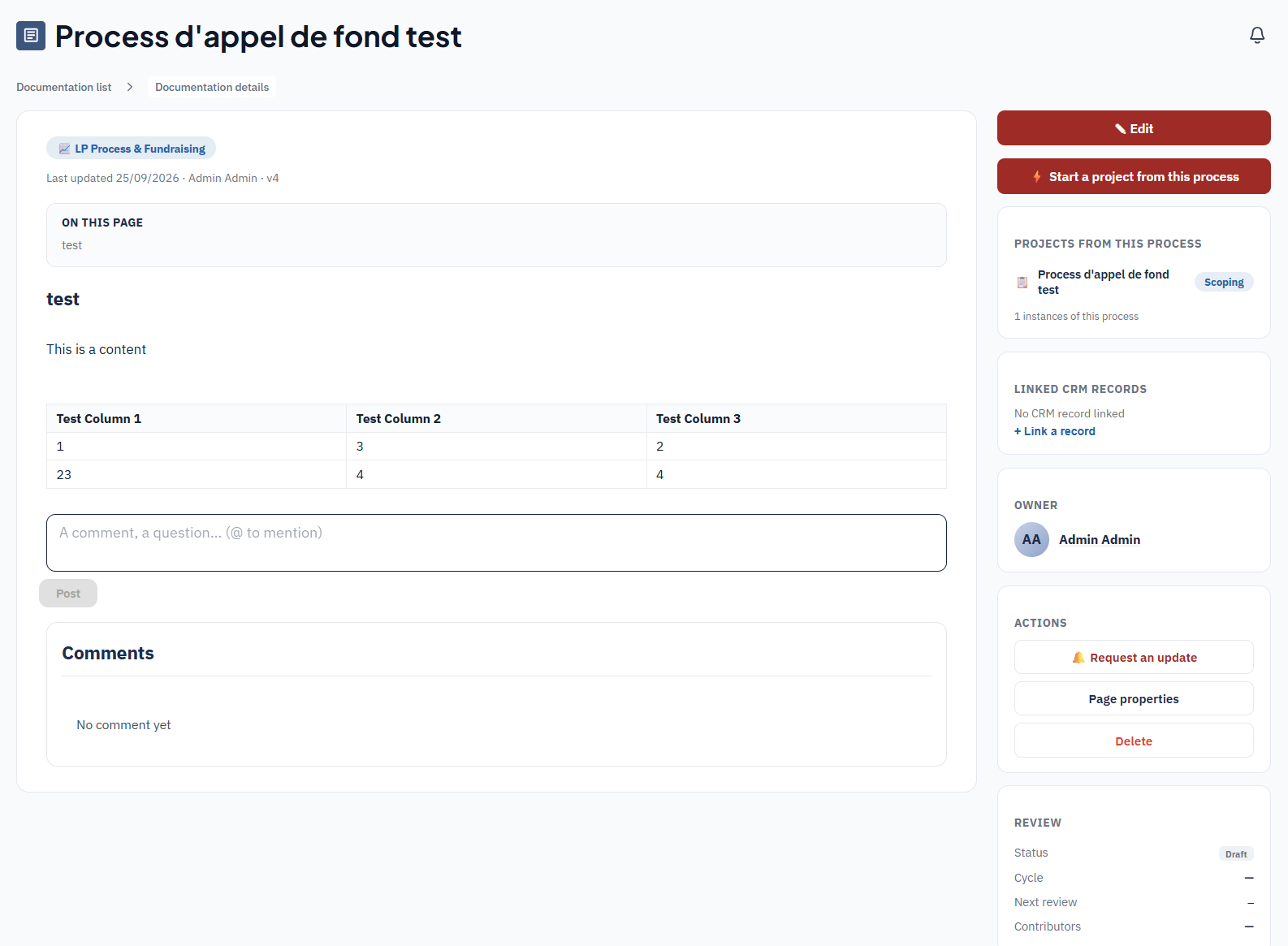
This is what sets Atlas apart from a wiki: the page describing how to do it becomes the project that does it, with no re-entry and without losing the link to its origin.
You document the process
The page describes the steps, the people in charge and the points to watch.
You launch the project
The process steps become phases or tasks, which you adjust before confirming. The project keeps its link to the process it came from, and the page shows how many projects it has spawned.
You capture the learning
When the project closes, Atlas invites the process owner to fold in what was learned along the way.
Steer your internal projects
Raising a new fund, switching tools, a regulatory programme: every project has its record.
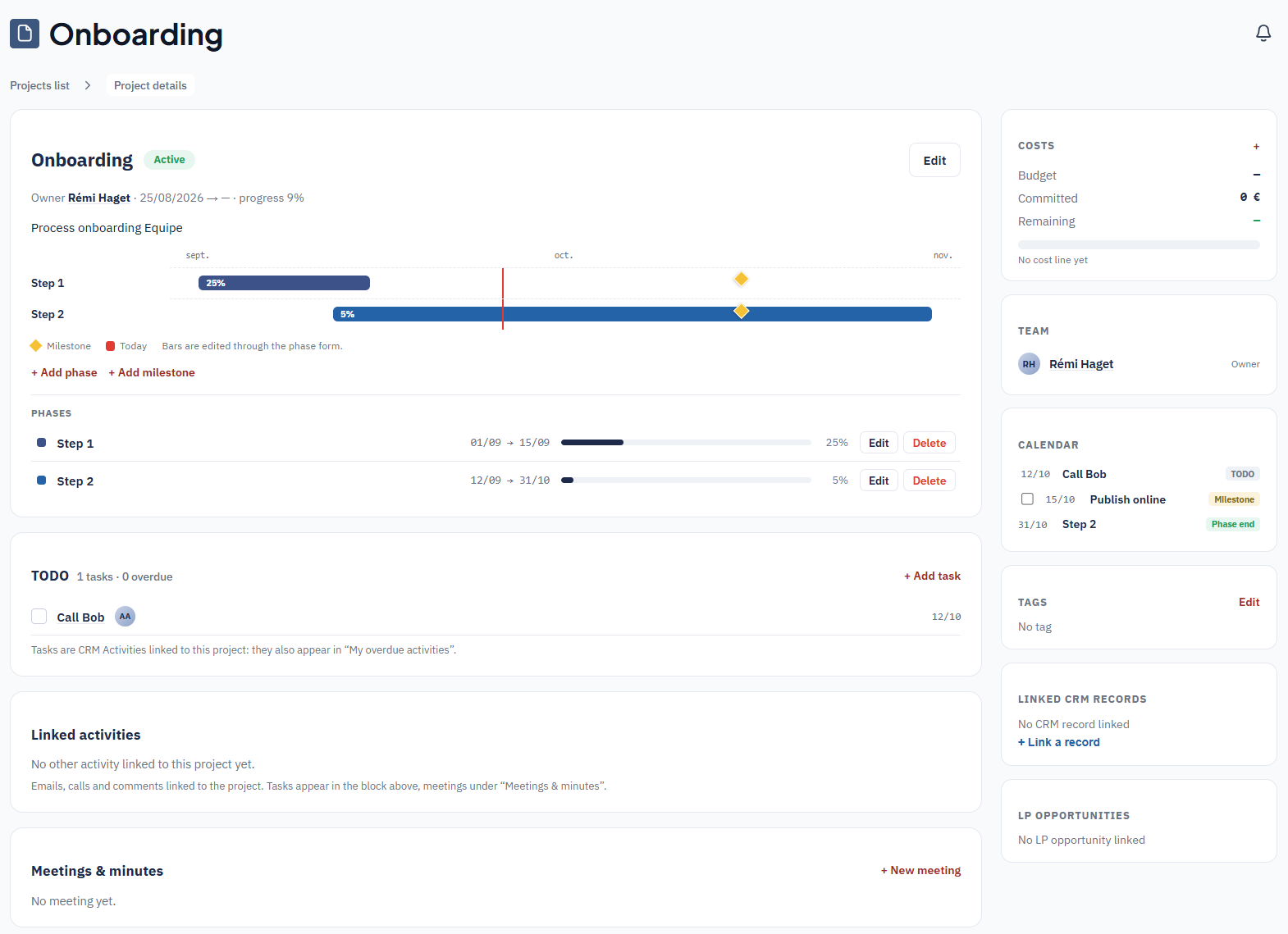
- Phases and milestones on a timeline, with each phase's progress.
- Tasks that don't get lost: project tasks are CRM activities, so they appear in the activities of the person they are assigned to, with their due dates and delays.
- A single calendar: milestones, due dates and meetings on one chronological view.
- Budget tracking: budget, committed amounts and remaining amounts, visible only to authorised people.
- An overview: the project list shows progress, the current phase, the next milestone and overdue tasks.
All your tasks in one table, grouped by phase
Each task carries the information a team needs to steer a delivery:
- The workload in working days.
- A confidence level: committed, proposed or assumption.
- A priority.
- A start date and a due date.
- A colour-coded status comment: OK, at risk, blocked.
Decisions and go / no-go points are marked with a diamond. The table can be filtered and sorted by status, confidence, person or phase, and a filtered view can be shared with a simple link.
A week-by-week roadmap, ready to share
The roadmap shows each phase's tasks on a grid of weeks, with the week number and the Monday's date, and the current week highlighted. Each task is a bar coloured by status, running from its start to its due date. Decisions and milestones are diamonds.
- Per project, on the project page.
- For the whole portfolio, in the Planning view, over the period of your choice.
- One-click Excel export, laid out like the roadmaps your teams maintain by hand today, with the update date. It is ready to send to a committee or a partner.
Approve each task, on the technical side and on the business side
The assignee marks the task as finished. The technical team and the business team each approve it on their own side: the task is only "Done" with both approvals. If something is missing, an approver sends it back with a reason, added to the task's comment thread.
An abandoned task is closed as "Won't fix", without skewing the tracking.
Plan and balance the workload
The Planning view brings all your projects onto one timeline, filterable by period, status, owner, member or tag. It lets you set priorities at a glance.
The Workload tab shows, for each person and each week, the estimated workload of their tasks against their capacity. Overdue tasks and unscheduled tasks are shown separately. Two ways to read the workload:
- On the due-date week, to see what has to be delivered.
- Spread over the working days between start and due date, to see who is busy, and when.
Run your acceptance testing without spreadsheets
Acceptance feedback, whether it comes from the business team or from a test campaign, is tracked directly in the project.
- Every item is complete: type (bug, to confirm, suggestion, remark), priority, module, screen concerned, observed behaviour, expected behaviour, environment, reporter and the team's answer.
- Instant counters: total, open items, items to retest, and breakdown by priority.
- Items grouped by module, filterable by status, priority, type or module.
- Bulk status change: after a delivery, all fixed items move to "Fixed / to retest" in a single action. Each then goes through the approval circuit, and only the project lead closes or reopens.
- An Excel template for your contacts: a simple file (module, ID, date, remark, status, answer), in French, English or German, to fill in without access to the CRM. You then send them back the updated status, in the same format.
Every project has its team
Add the colleagues who work on a project, and choose each one's access level.
Editor
Moves the project forward.
Reader
Follows the project without changing it.
Visible to its team
A project is visible only to its team. Managers who need an overview can see every project.
One person per task
Each task is assigned to a specific person, who joins the team if not already in it. External providers and advisers also appear in the team, without CRM access.
Meetings that produce decisions
Prepare the agenda, write the minutes on the project record, then turn each decision into an assigned task. Minutes useful beyond the project can be published as a documentation page.
With Bodic Meeting, an assistant joins your video calls, writes the minutes and suggests next steps to turn into tasks.
Everything is linked to your CRM
That's the difference from a generic project management tool: Atlas knows your accounts, funds and opportunities.
Links both ways
A page or project links to an account, contact, fund or opportunity, and the CRM record in turn shows the documentation and projects concerning it.
Processes that apply to a whole type
A process can apply to every fund, and then appears on each of them.
One single search
Pages and projects are found through the CRM's global search, alongside your contacts and funds.
Discuss where the topic lives
Not one more messaging tool: comments anchored to a page, a project, a task or a record.
Mention a colleague
With @, they are notified, and one click takes them to the right place.
Turn a comment into a task
Assigned, without retyping anything.
Connected to the whole Bodic platform
Atlas builds on your existing data and enriches it with what your team knows.
Bodic CRM 360°
Project tasks are CRM activities, visible in each relationship's timeline. Explore Bodic CRM 360°
Bodic Meeting
An assistant writes the minutes of your video calls and suggests the tasks that follow from them. Explore Bodic Meeting
Bodic Capture
Captured emails and project tasks line up in the same activity timeline. Explore Bodic Capture
Bodic LP Pipeline
A fundraise is run as a project, linked to the LP opportunities. Explore Bodic LP Pipeline
Bodic Deal Flow
Pages and projects link to the Deal Flow's transactions. Explore Bodic Deal Flow
Bodic Data Room
Reference documents stay in the Data Room, with its fine-grained rights. Explore Bodic Data Room
What our clients ask us
How is this different from Notion or Confluence?
A general-purpose wiki knows nothing about your data. In Atlas, a page attaches to a fund or an account, a project links to the opportunities it concerns, and a task is an activity in your CRM. Documentation stops being a folder on the side and becomes a layer of your information system.
How do I know a process is still valid?
Each page carries a status — up to date, to review, draft or archived — and an owner. It switches back to "to review" automatically on the date you set, and any colleague can request an update in one click.
Who sees which projects?
A project is visible only to its team, where each person is an editor or a reader. Managers who need an overview see every project. External contributors appear in the team without CRM access.
Can we follow several projects without opening every task?
Yes. The project list shows progress, the current phase, the next milestone and overdue tasks. The planning view brings every project together in one filterable view, and each person's workload reads week by week.
Where is this data hosted?
In France, like the rest of the Bodic platform, on Clever Cloud infrastructure.
See Atlas in action, on your own processes
In 30 minutes, let's look at how your procedures, notes and projects can stop living beside your CRM.